At a glance
- Role
- Product owner and designer, building with Claude Code
- Team
- Solo, with Claude Code writing the code
- Tools
- Slack (Bolt for JavaScript, TypeScript), Firebase Cloud Functions, Firestore, Google Cloud Billing, Claude Code
- Timeline
- June–July 2026
- Status
- Live in Ranelagh Ultimate’s Slack since late June 2026
What it shows
- Product decisions under hard constraints: free, self-reported, Slack’s own limits
- Designing for zero running cost, and proving it
- One flexible challenge model instead of hard-coded types
- Reworks driven by real use
- Phase-by-phase testing and a stress test
Highlights
- Free to run: the goal from day one, held by four layers of cost protection
- 316 ms median response in a 150-request stress test (Slack allows 3 seconds)
- ~1% of the free daily quota used by a whole day of deploys and tests
Discover
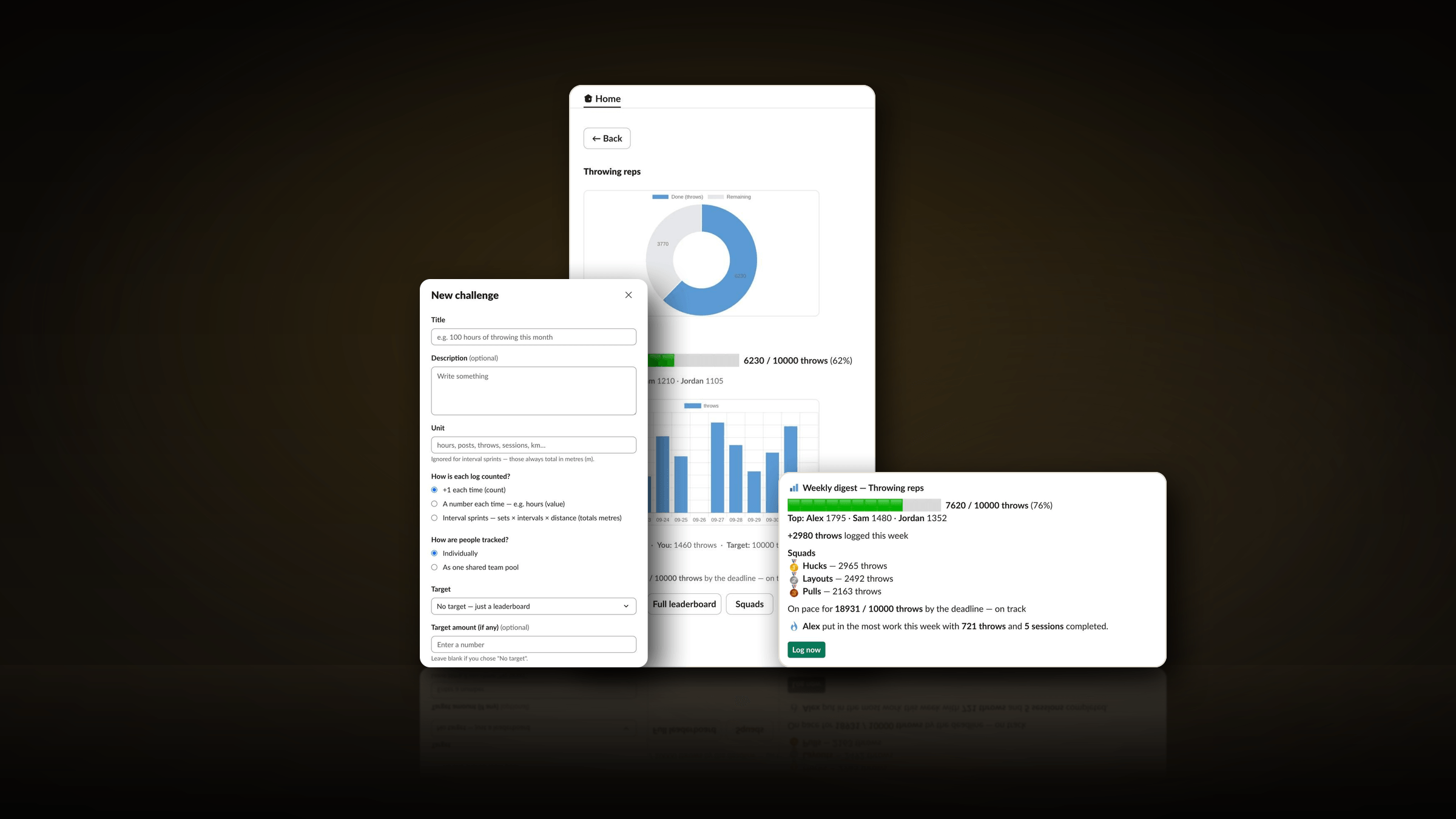
Lagh Leaderboards is a bot that runs team challenges for my club, Ranelagh Ultimate, inside the club’s Slack. Anyone can set up a challenge, and members log their progress with a button and a short form. The bot then:
- keeps the leaderboards
- posts updates on a schedule
- sends a Friday digest
- sums each challenge up when it ends
Every member also gets their own dashboard in the bot’s Home tab.
I play Ultimate at an elite level, for club and country, and represented Ireland in 2025. The club uses the bot for its training challenges, such as its “Road to Euros” throwing and interval challenges.
Before the bot, there was nothing: members posted their own photos and comments in the club’s Slack.
How I built it
That was deliberate. Building with AI keeps me at the forefront of AI-assisted development and new tech, and gives me new ways to bring ideas to life.
How it came together
7 steps · 8 reworks · 2 milestones
- Step
- Rework: went back and changed something
- Milestone
1Plan23 June 2026
Limits and decisions
Free, self-reported, and built around Slack’s free plan, with the bot’s own database as the record.
2Build23–24 June
Managing and deleting challenges
Back to 03: The core: create, log, leaderboard
An admin list with Post now, Digest now, Edit, Archive, and Delete with a confirmation.
Why: An accidental duplicate challenge showed there was no way to tidy up.
The dashboard and scheduled posts
A personal dashboard in the Home tab, and updates on a schedule chosen for each challenge.
Reworked later in06
Reactions taken out of the dashboard
Back to 05: The dashboard and scheduled posts
A cheer button became an emoji menu, then a link to the channel post, and was finally removed at my request.
Why: Slack can’t show its emoji picker inside the Home tab.
Feature batches, each tested in Slack
Squads, streaks, My stats, milestone celebrations, and a light brand: the club’s badge as the bot’s icon, and five custom emoji.
Reworked later in08
An emoji diet
Back to 07: Feature batches, each tested in Slack
Far fewer emoji, with the club’s badge and five custom emoji instead.
Why: Heavy emoji felt tacky, and the club needed to take the bot seriously.
3Make it free, then launch23–25 June
Hosting rethought, twice
Back to 02: Proving the connection
From my laptop, to a plan for an always-on machine, to cloud functions with safeguards built before billing was switched on. The full story is in “Running it for free”.
Why: It had to stay free with my laptop off. A cost walkthrough showed cloud functions could do that, if they were free by design.
Four layers of cost protection
A meter that pauses the bot before the free limit, caps on running copies, a budget alert, and a kill switch that switches billing off.
Answer first, work later
Back to 03: The core: create, log, leaderboard
The bot answers at once and does the slow work in the background, safely even if it runs twice.
Why: Slack allows 3 seconds for an answer. Doing all the work first caused errors, retries and duplicate posts.
Every log made cheap
Back to 03: The core: create, log, leaderboard
Running totals, the dashboard feed removed and corrections capped: a flat 6 writes and 4 reads per log, and room for 2,500–3,000 logs a day.
Why: At first the free database reads would have run out at around 200 logs a day.
Stress test, kill switch drill and go-live
150 signed requests, all answered in under half a second, and a kill switch proven to really switch billing off.
Into the club’s Slack
Moved from my test workspace, with the test data wiped.
4Real use28 June – 7 July
Logs posted by the bot, led by the member’s name
Back to 03: The core: create, log, leaderboard
Four fixes in under an hour, once real members were using it. Photos are no longer stored.
Why: Posting as the member silently fell back to an anonymous bot post, and only a bot post can show a private photo.
Challenges stay open past 100%
Back to 03: The core: create, log, leaderboard
A challenge now runs to its end date, and its progress bar turns gold past 100%.
Why: Goals should be beatable: hitting the target shouldn’t end the challenge.
Reviewed and refined
A review from four angles found five problems, all fixed, and interval sprints were added.
Define
The limits it had to work within
It had to work within some hard limits from the start:
- Free. There was no budget, so it had to run on free tiers, and stay there.
- Trust, not proof. Progress is self-reported, and every new challenge says so.
- Slack’s free plan. The club’s Slack only keeps 90 days of history, allows 10 apps and has no Workflow Builder. So the bot’s own database is the record, not Slack.
- No admin access at first. I built and tested it in my own Slack workspace, then moved it to the club’s.
One challenge model, not many
Instead of hard-coding challenge types, three choices make up any challenge, so new kinds of challenge need no new code:
- How each log counts+1, a number (like hours or kilometres), or interval sprints: sets × intervals × distance.
- Who it tracksIndividuals, or one pool for the whole team.
- The targetNone, a target per person, or one for the whole team.
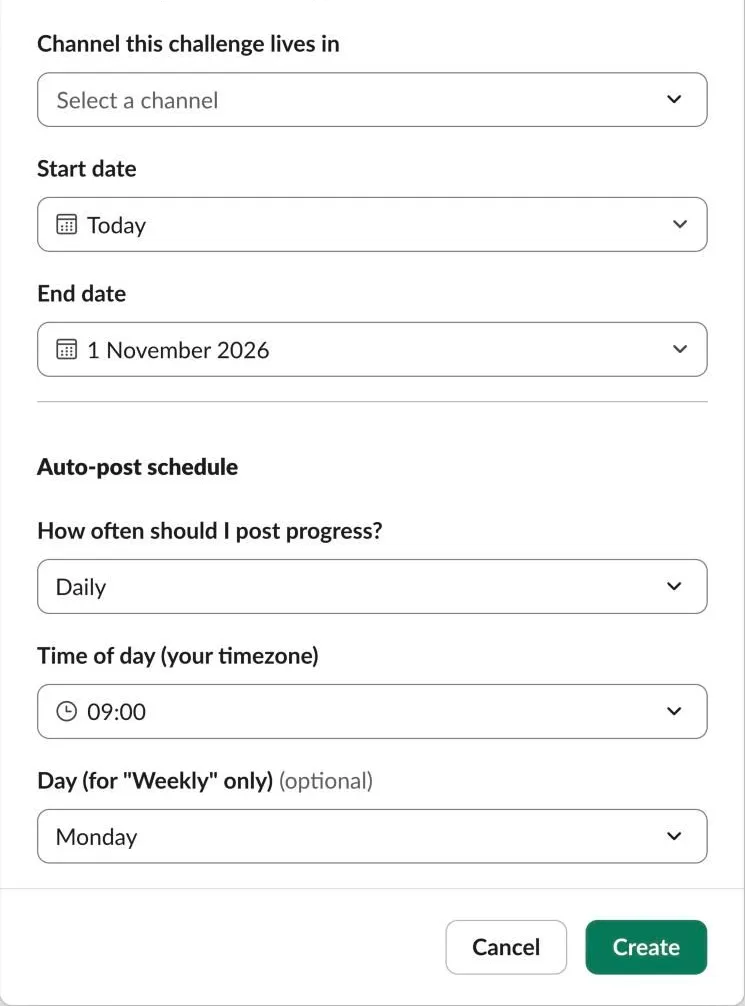
Each challenge also has its dates, its channel, and how often it posts updates, at a local time.
Every Slack screen on this page comes from the bot’s own code, run with made-up members and challenges and drawn by Slack’s own previewer (Block Kit Builder) in October 2026, so no real member appears. The previewer can’t load the bot’s custom emoji or its charts, so those were added from the bot’s own emoji files and chart links. Names show in bold where Slack would show an @-mention, and posts appear without the bot’s name and icon.
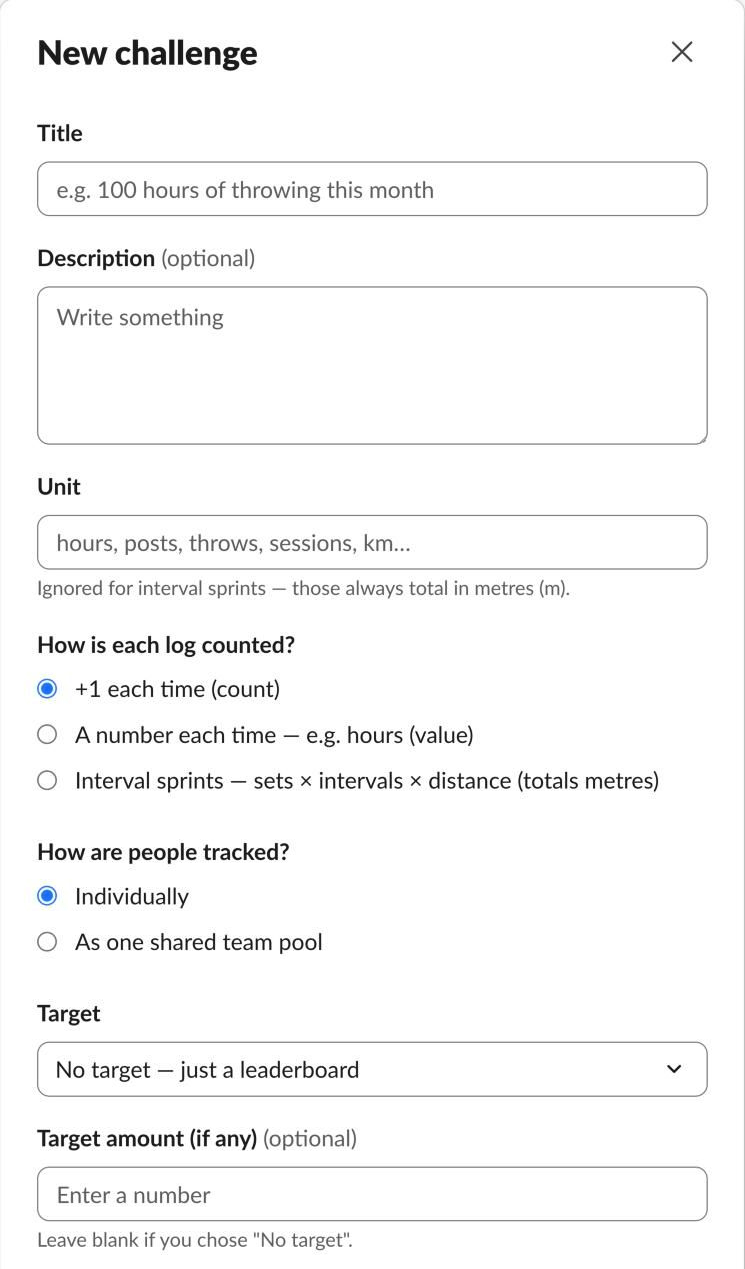
The new challenge form: a title and a unit, then the three choices that make up any challenge. 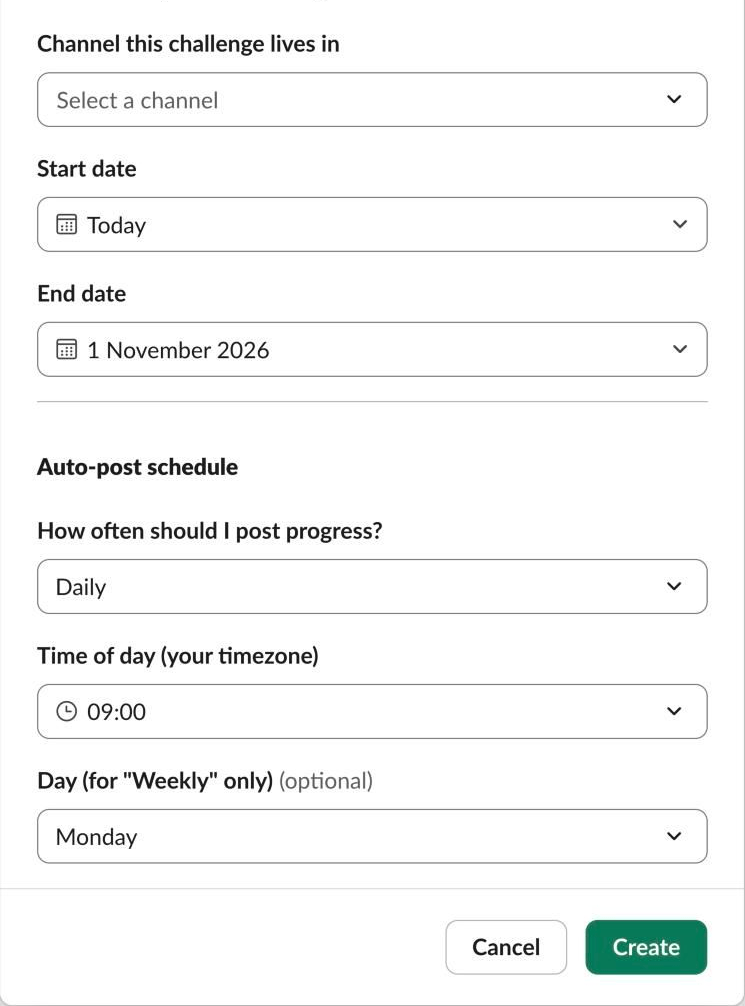
Further down: the channel, the dates, and when to post updates, in the creator’s own time zone.
Design
How the system works
In Slack
- Club membersSlash commands, buttons and forms
- Channel posts and messagesLogs, updates, digests and celebrations
- The Home tabEach member’s own dashboard
Google Cloud (free tier)
- Request handlerChecks Slack’s signature and answers within 3 seconds
- Background workerRuns when a log is saved: posts, milestones, dashboards
- SchedulerEvery 15 minutes: updates, digests and final summaries
- FirestoreThe record: challenges, logs, streaks and squads
Safeguards and extras
- QuickChartDraws the charts, from numbers and rank labels only, never names
- Usage meterPauses the bot before it reaches a free daily limit
- Budget and kill switchAn alert, then billing switched off if costs ever appear
How it flows
- A member logs progress in Slack. Slack sends a signed request to the handler.
- The handler checks it, saves the log and updates the running total in one write, and answers straight away.
- Saving the log wakes the background worker, which posts to the channel (with the photo), checks for milestones and refreshes dashboards.
- Every 15 minutes the scheduler posts any updates due, Friday digests and end-of-challenge summaries.
- Every function counts its database use. Near a free daily limit, the bot pauses politely and tells me.
Logging progress
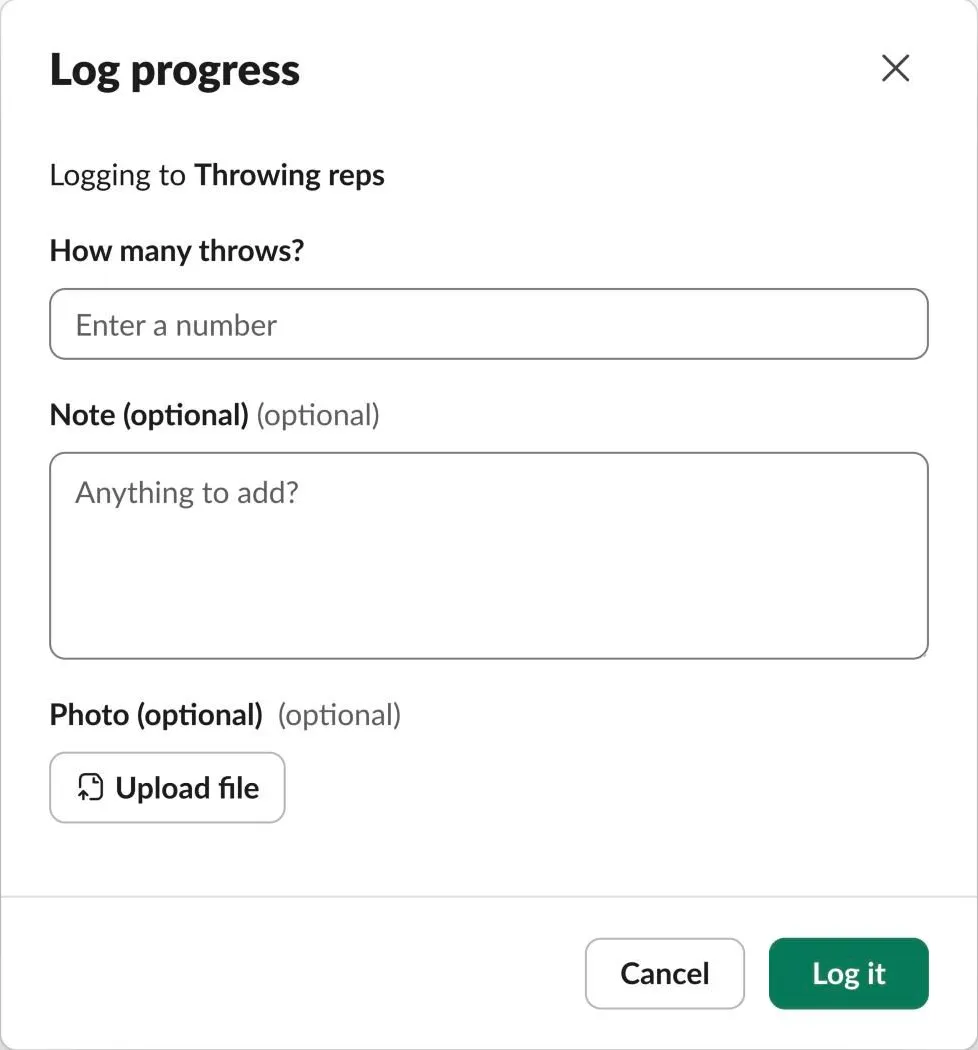
A log takes a button and a short form: the amount, plus an optional note and photo. The channel post leads with the member’s name, the amount and the challenge, then the note, a progress bar and the photo. Photos are posted to the channel but never stored.
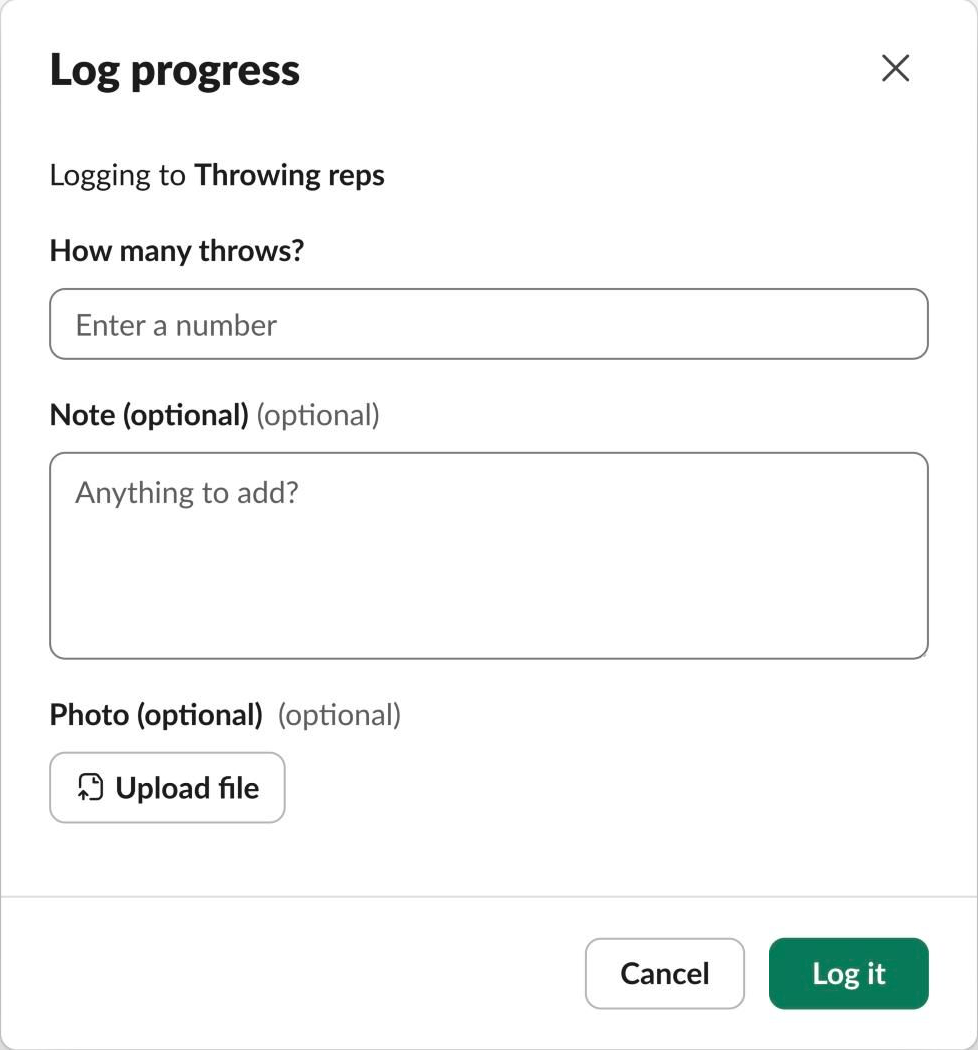
Logging an amount: one number, plus an optional note and photo. 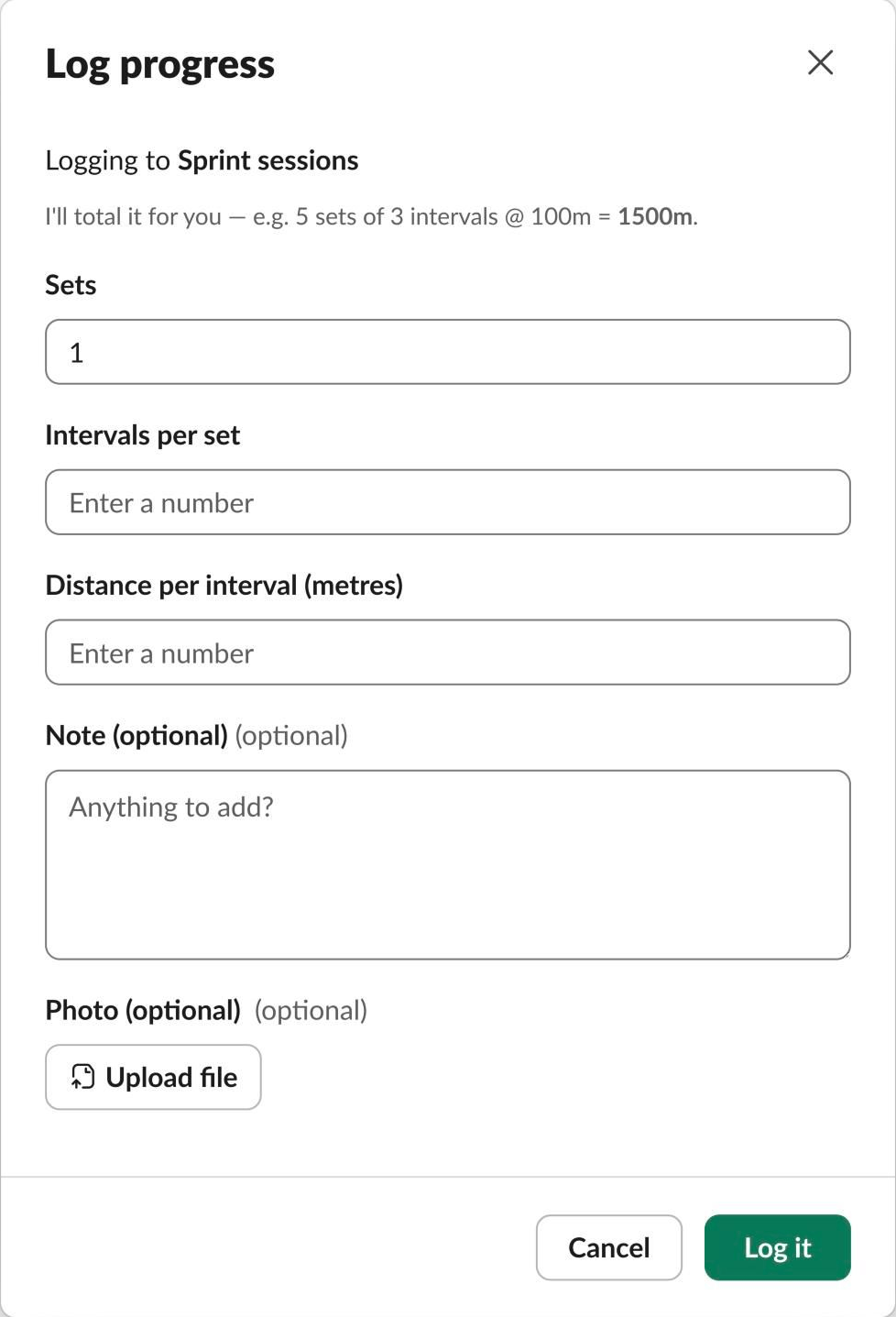
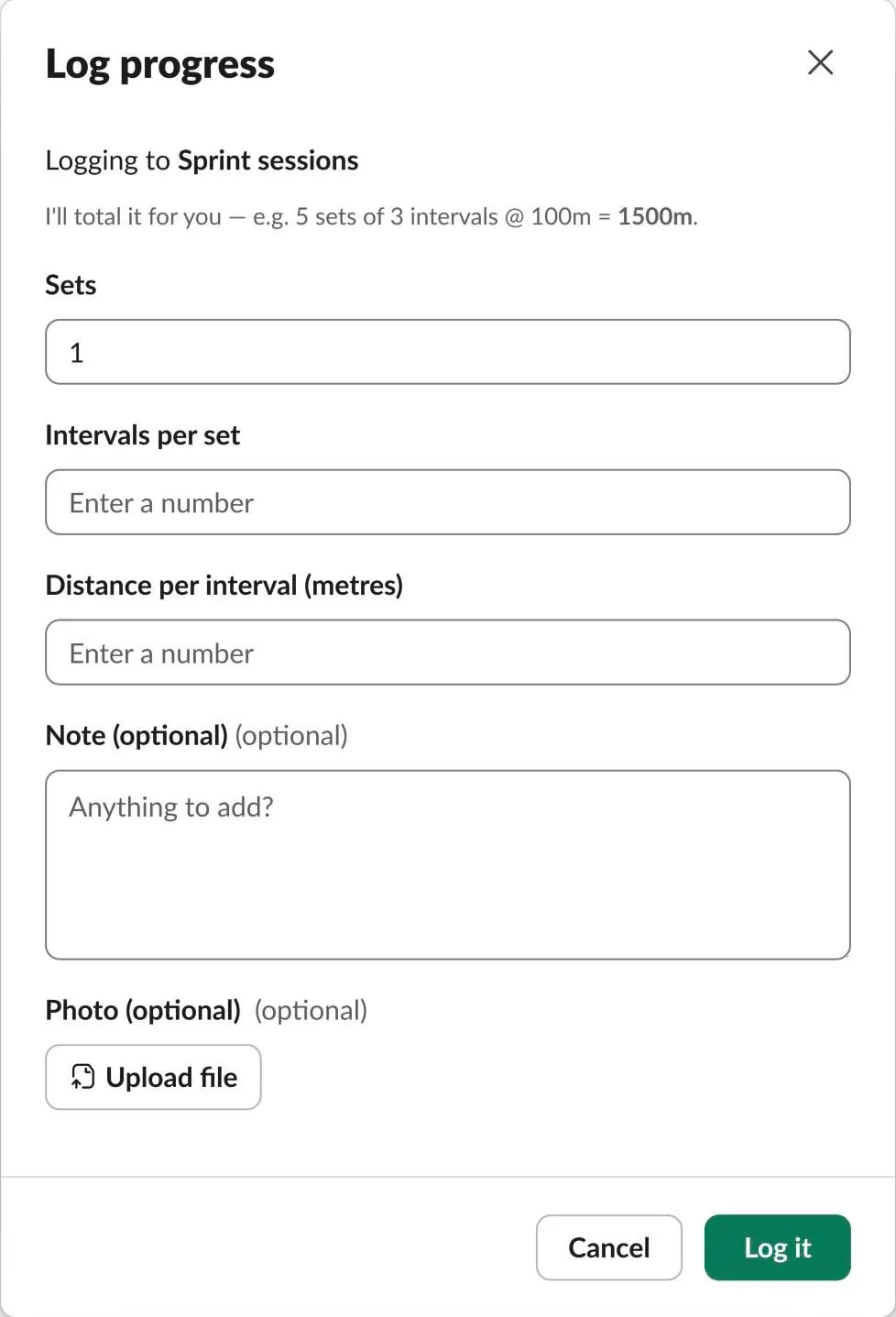
Logging interval sprints: sets, intervals and distance, and the bot works out the total.

Leaderboards, call-outs and the dashboard
- Leaderboards: /leaderboard, a top three on each dashboard card, and a full board. The full board also lists members still on zero, each with a “Call out” button that gives them a friendly nudge in the channel.
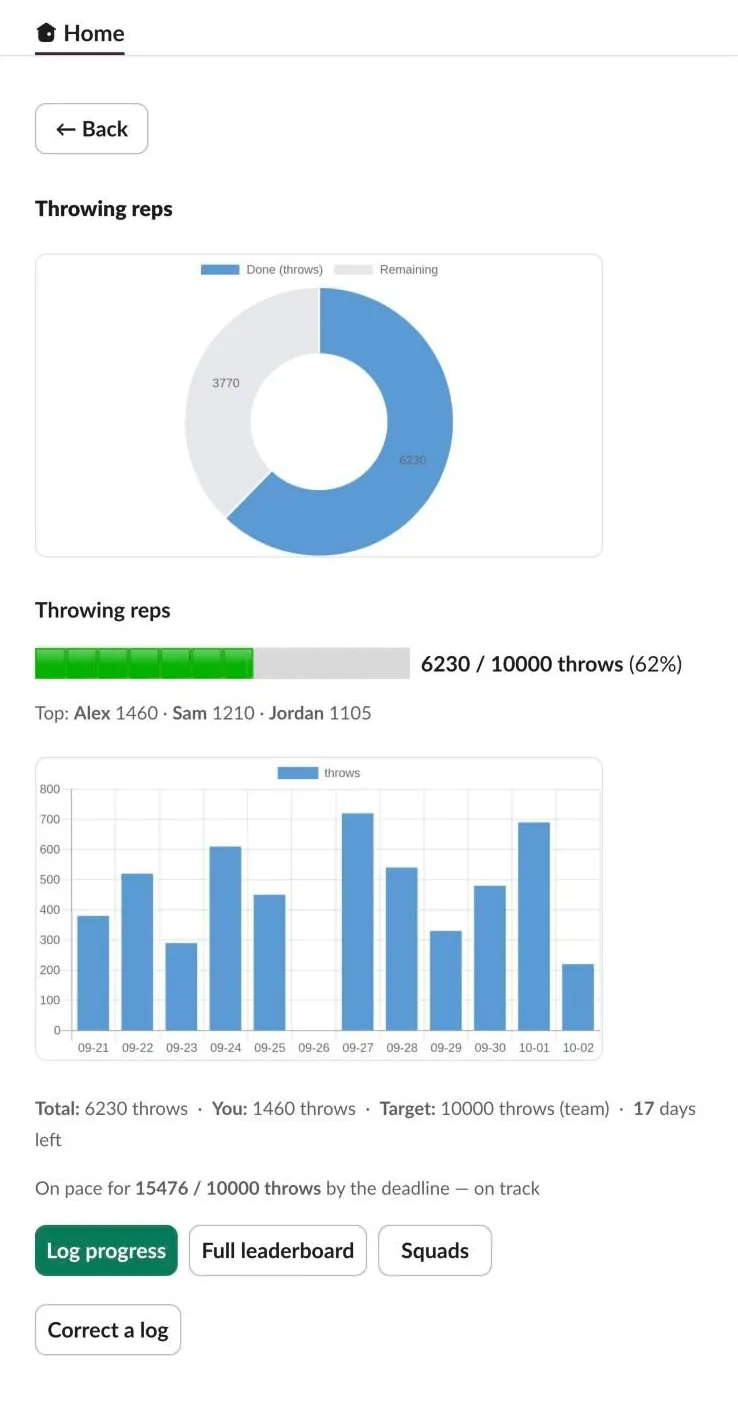
- The dashboard (in the Home tab): an overview, each challenge’s detail with charts and 14 days of activity (“on track” or “behind pace”), My stats, squads, and “Correct a log”.
- Squads: hand-picked teams that can be reused across challenges.
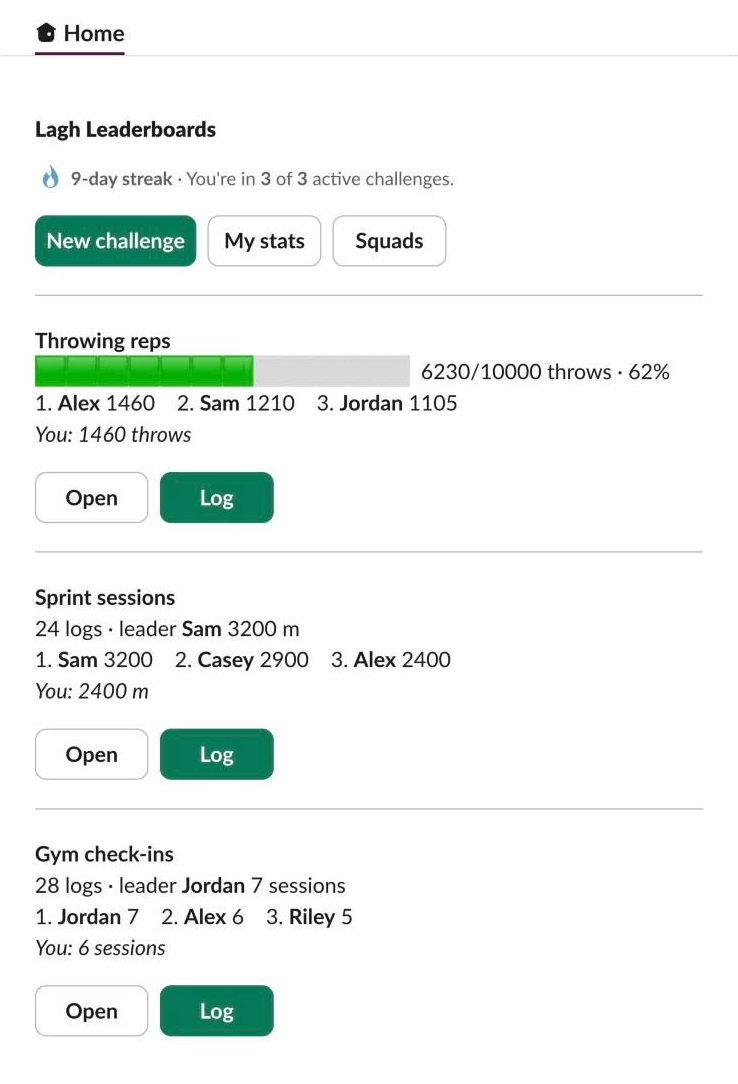
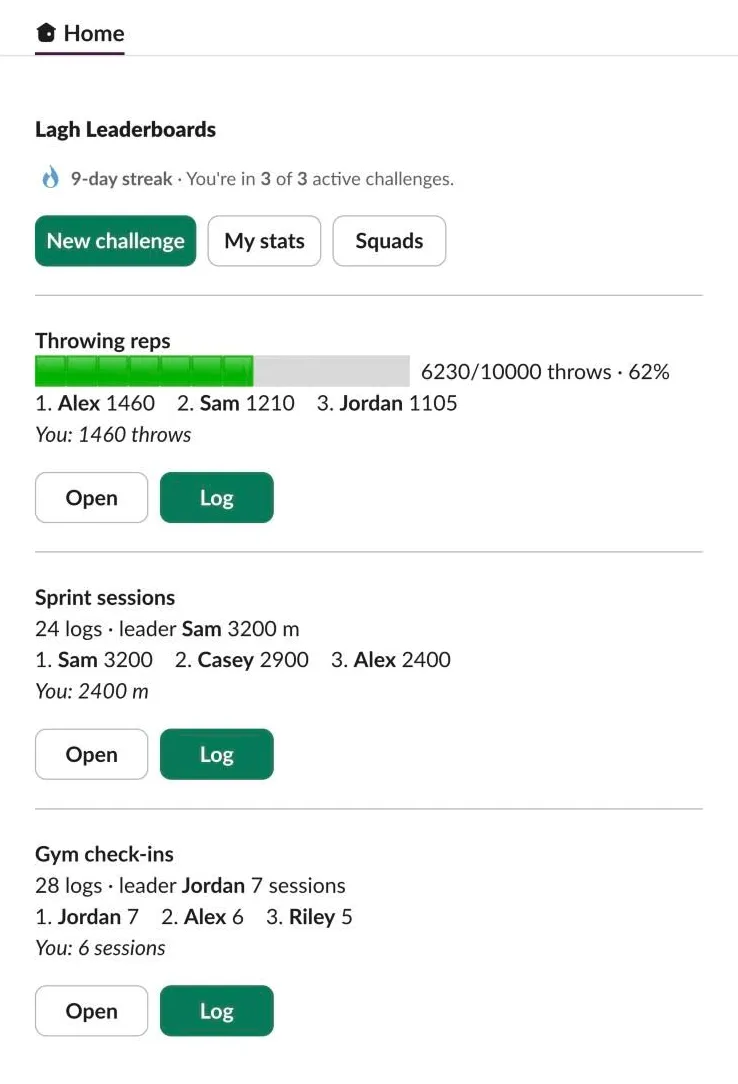
The overview: your streak, then each challenge you’re in, with its top three and your own total. 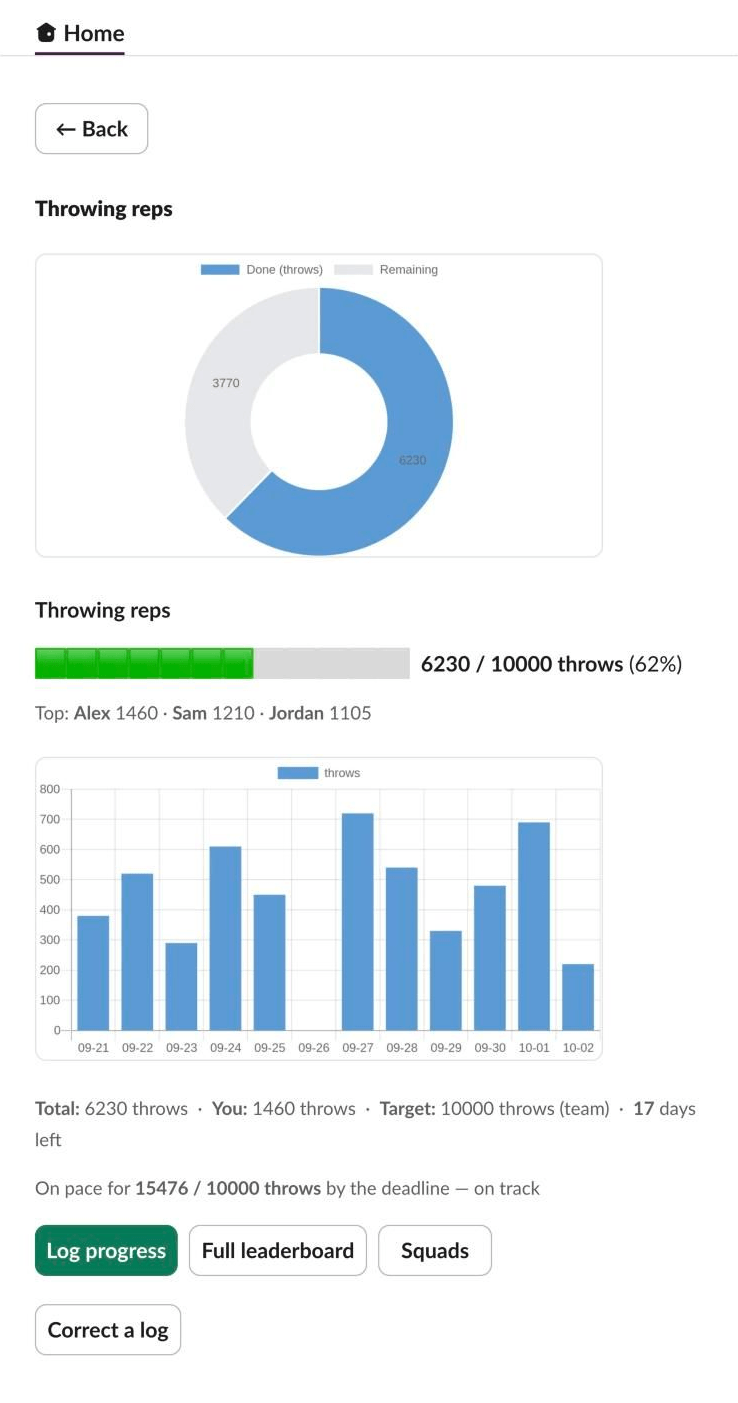
A challenge in detail: charts, daily activity, and whether the team is on track. 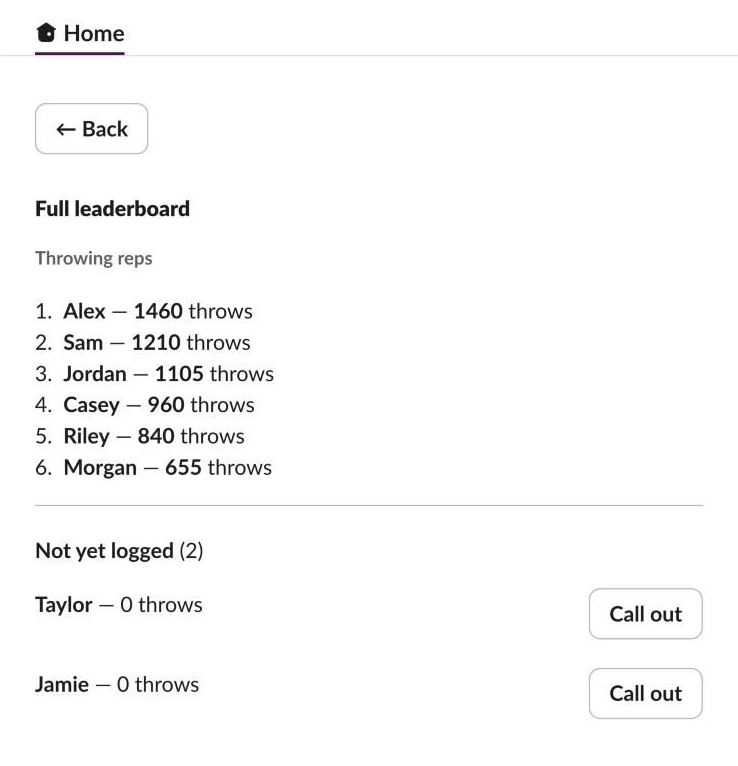
The full leaderboard. Anyone still on zero gets a Call out button: a friendly nudge in the channel.
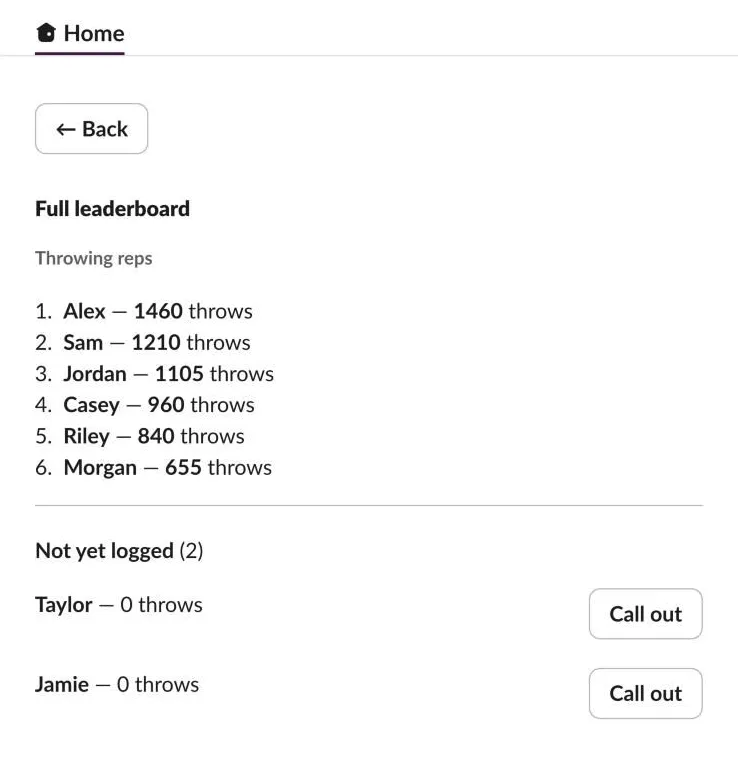
The call-outs have gone down well. Before, nudging a teammate meant putting your name to it, so people didn’t; now the nudge is anonymous, and because it comes from the bot, it takes some of the harshness out.
Celebrations and scheduled posts
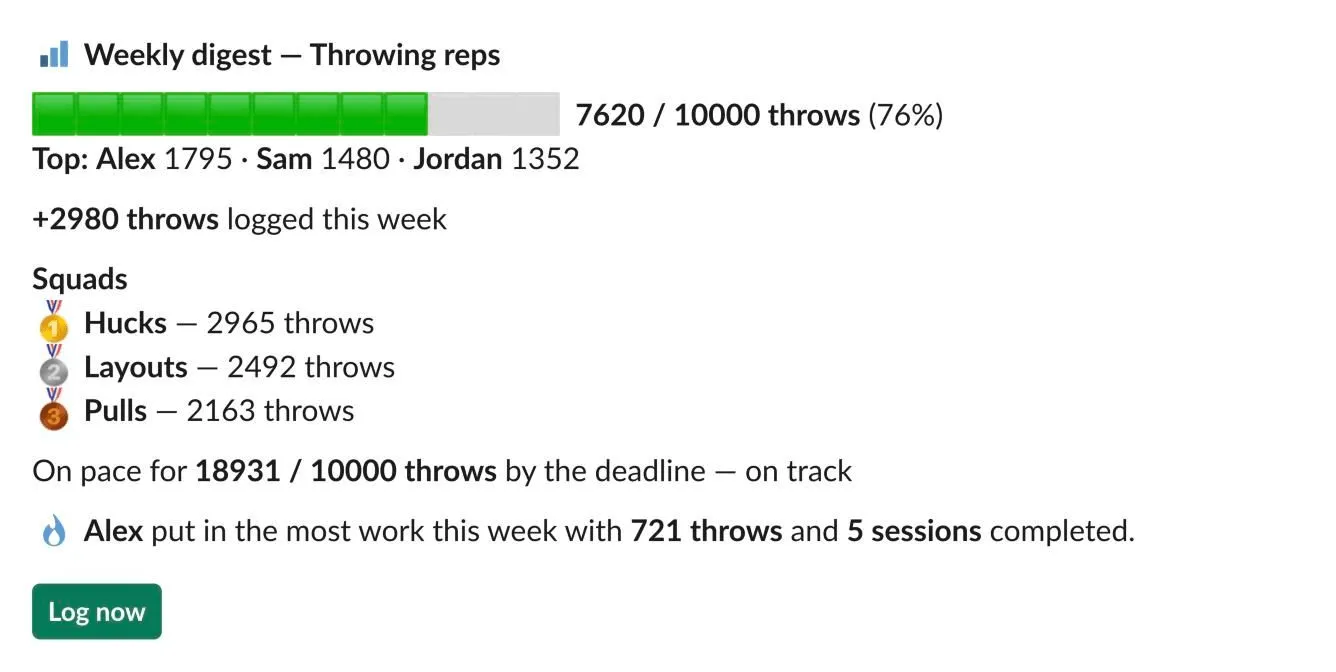
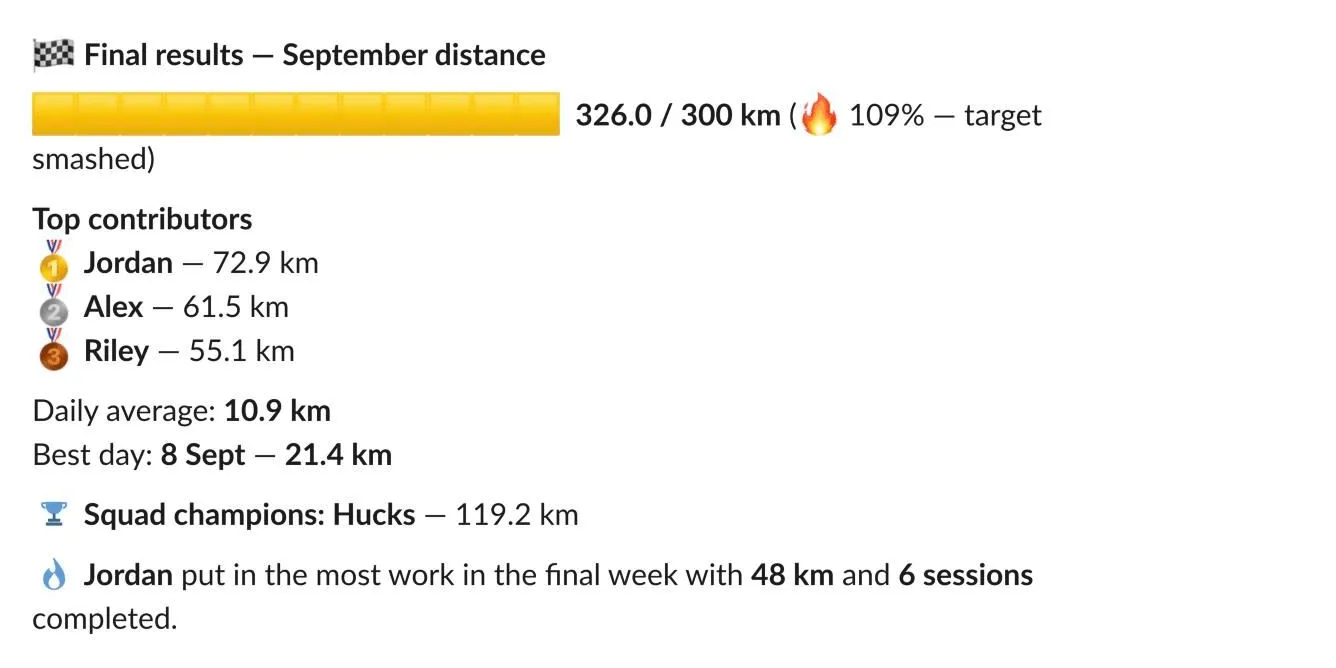
The bot celebrates 25%, 50% and 75% of a target and the moment it’s reached. Past 100%, the bar turns gold and says the target was smashed. Scheduled updates include a squad board. Every Friday a digest shouts out the top performer. The day after a challenge ends, a final summary shows the top three, the daily average, the best day and the winning squad, and the challenge closes.

What changed, and why
| What wasn’t working | Leads to | What changed |
|---|---|---|
| Doing all the work before answering broke Slack’s 3-second limit, causing errors, retries and duplicate posts. | The bot answers at once and does the rest in the background, safe to run twice. | |
| Posting as the member silently fell back to an anonymous post, and only the bot can show a private photo. | The bot posts each log, led by the member’s name. | |
| Adding up every log on each view would have used up the free reads at around 200 logs a day. | Running totals on each challenge: a flat cost per log, whatever the size. | |
| Slack can’t show its emoji picker in the Home tab. | Reactions were taken out of the dashboard. | |
| A challenge closed as soon as it hit its target. | It runs to its end date, and the bar turns gold past 100%. | |
| Heavy emoji felt tacky. | An emoji diet, the club’s badge as the icon, and five custom emoji. |
A light brand: the club’s badge and five emoji
Early versions leaned on Slack’s emoji, and they felt tacky: the club needed to take the bot seriously. Most of them went. The club’s winged-R badge became the bot’s icon, and five custom emoji took the place of Slack’s, each with one job. The emoji are light blue, with darker blue and white for depth, so they stay clear in both Slack’s light and dark themes.
| Emoji | When the bot uses it |
|---|---|
 |
A new challenge is posted |
 |
The team passes 25%, 50% or 75% of its target, and the weekly digest |
 |
A member reaches their own target |
 |
A member’s daily streak, and who put in the most work each week |
 |
The team reaches its target, and the winning squad when a challenge ends |

Deliver
Running it for free
From the very first day, the rule was that the bot had to be free to run. That’s harder than it sounds. Google Cloud needs a card on file and has no true hard spending cap, so “free” had to be designed in, and then proven. The target became effectively $0, with a worst case of a few cents before the bot switches itself off.
The route to free
9 steps · 4 reworks · 1 milestone
- Step
- Rework: went back and changed something
- Milestone
1Decide23 June 2026
Free from day one
Run on my laptop on free tiers, keep running totals instead of reading every log, and move the scheduler from every 60 seconds to every 5 minutes.
Hosting under the free rule
Firebase’s pay-as-you-go plan needs a card, so the first plan was an always-on machine I own.
Reworked later in03
Free by design instead
Back to 02: Hosting under the free rule
Pay-as-you-go, with the safeguards built and tested before billing was switched on, and “pause, don’t pay” if anything were ever charged.
Why: A cost walkthrough showed everything fitting inside the free tier, and only cloud functions keep the bot running with my laptop off.
2Safeguards first24 June
Four layers agreed
The first layer, a meter that pauses the bot before any free limit, was my idea.
Deploy problems fixed
Back to 05: The cloud version built and tested
Each one was fixed before go-live.
Why: The first deploys tripped over a renamed settings file, a missing alert topic, a required service that was switched off, and rate limits.
3Prove it24–25 June
A silent failure, fixed
Back to 07: The kill switch drill
The service was enabled and the function given the right role, then the drill was run again: billing really switched off.
Why: Over budget, it fired but couldn’t switch billing off: the Cloud Billing service wasn’t enabled. Billing stayed on, with only an error in the logs.
Every log made cheap
The dashboard feed removed and corrections capped: from about 200 to 2,500–3,000 logs a day within the free tier.
The stress test
150 signed requests, all answered in under half a second. The whole day of deploys and tests used about 1% of the free daily quota.
Live, and the laptop retired
4Watch the bill25 June – 7 July
The scheduler slowed to every 15 minutes
About 96 runs a day instead of 288: a third of the always-on cost.
The 1-cent question
A charge of about a cent a day turned up. An audit and the billing report showed the free tier covering it.
The meter’s blind spot fixed
Back to 05: The cloud version built and tested
Usage is now recorded on every path. The kill switch was capped at one copy, and the weekly shout-out reads only the last 7 days.
Why: Early exits in the background job skipped recording its usage, so the meter could under-count.
Choosing where to run it
| Option | What it needed | Outcome |
|---|---|---|
| My laptop, connected to Slack over Socket Mode | Free, but the bot stops when the laptop does | Used while building, until go-live |
| An always-on machine I own, over Socket Mode | Free, with no card and no code changes, but it needs a process manager and automatic restarts | The first plan under the free rule |
| Free cloud hosts | Either a card, or they sleep when idle, which disconnects a Socket Mode bot | Ruled out |
| Cloudflare Workers | Free with no card, but the Slack and Firebase libraries won’t run there without a big rewrite | Ruled out |
| Socket Mode on a cloud server | It can’t scale to zero, so it’s always on and never free | Ruled out |
| Cloud Functions over the web, on Firebase’s pay-as-you-go plan | Scales to zero when idle. Needs a card, and the scheduler rewritten as a scheduled function | Chosen |
A cost walkthrough settled it. For about 40 people, five challenges and daily posts, everything sat inside the free tier. Only database reads could come close to the free limit of 50,000 a day, with a worst case of around $0–2, and those could be designed down. So the plan flipped: pay-as-you-go, but free by design. The safeguards were built and tested before billing was ever switched on, and if anything were charged, the bot would pause, not pay.
The free limits that mattered
- Firestore: 50,000 reads, 20,000 writes and 20,000 deletes a day, resetting at midnight Pacific time. These are the limits the bot measures itself against.
- Cloud Scheduler: three free jobs. The bot uses one.
- Everything else (function time, stored deploy images, logs and outgoing traffic) is watched by the budget. Deploy images older than a day are deleted automatically.
- No image storage: photos stay in Slack, and the free plan keeps them for 90 days, so there’s nothing to pay for.
- Charts come from QuickChart, a free service. If it’s down, the dashboard falls back to text.
Four layers of protection
- Layer 0: a meter that pauses firstMy idea. Every database read, write and delete is counted. At 50% of a free daily limit the logs warn; at 75% the bot pauses, tells members it’s paused for today to stay within its free limits, and can message me. It resumes by itself when the quota resets, and if the meter itself fails, the bot carries on.
- Layer 1: lean code and capped copiesAt most 10 copies of the request handler and one of the scheduler, so a bug can’t multiply. Small memory, short timeouts, running totals and a slower scheduler.
- Layer 2: a budget alertA small budget that emails me at about a cent, independently of everything else.
- Layer 3: a kill switchIf the actual cost goes over budget, a function switches billing off for the project. Nothing more can be charged, and turning billing back on is a decision I make by hand.
- Budget alertGoogle Cloud sends the budget’s status as a message
- The kill switch checksIt acts only if the actual cost is over budget
- Billing switched offThe project drops back to free limits, and the bot stops
- I decideRe-link billing, and the functions resume by themselves
Budget data runs a few hours behind, so the worst case is a few cents. I chose “pause, don’t pay”: a stopped bot is better than a bill.
Making every log cheap
The biggest risk to the free limits was database reads that grow as the club uses the bot. Each change took one away:
- Running totals. Leaderboards used to add up every log. Now each log updates the challenge’s totals (overall, per person and per day) in the same write, so reads grow with the number of challenges, not logs. Squad boards are worked out from these totals, with no extra reads.
- The dashboard feed went. It read every log of a challenge each time it opened: the only cost that grew with a challenge’s size. The posts already appear in the channel.
- “Correct a log” shows only your own logs, first the last 8 and then just the last one, since a correction is almost always undoing what you just logged.
- The scheduler slowed down: from every 60 seconds on my laptop to every 5 minutes, then every 15 in the cloud. Posts still arrive within 15 minutes of their time.
- The weekly shout-out reads only the last 7 days.
- ~200Logs a day before the free reads ran out, at first
- 6 + 4Writes and reads per log, whatever the challenge size
- 2,500–3,000Logs a day now, flat, before the meter pauses
The new capacity comes straight from the free limits: 50,000 reads ÷ 4 per log allows about 12,500 logs a day, and 20,000 writes ÷ 6 allows about 3,300. The meter pauses at 75% of that, around 2,500.
Proving it: the kill switch drill
A kill switch that has never been tested isn’t a safeguard, so we drilled it before launch, sending test budget alerts by hand:
- Under budget: it logged “no action”, proving the alert arrives and is read correctly.
- Over budget: it fired, but the call to switch billing off was refused: the Cloud Billing service wasn’t enabled, and deploying doesn’t enable it. Billing stayed on, with only an error in the logs. A real silent failure, caught before launch.
- The fix: the service was enabled, and the function was given the right role on the project, because a role on the billing account alone couldn’t do it.
- The proof: run again, it logged that billing was disabled. Billing was then re-linked, and the functions came back by themselves, without a redeploy, after a six-minute gap in scheduled runs.
Proving it: the stress test
On 25 June, 150 requests signed exactly like Slack’s were sent to the live bot, 20 at a time. They went through the signature check, the pause check and the meter, without posting anything to Slack.
- 150 / 150Requests succeeded, at about 60 a second
- 316 msMedian response (95% within 370 ms, worst 464 ms). Slack allows 3 seconds
- ~1%Of the free daily quota, for the whole day of deploys, tests and the load test
A request with a forged signature was rejected before any database work. The whole day, including every deploy and test, came to 279 function runs, 479 reads and 282 writes.
The bill
In July, a charge of about one cent a day appeared. A read-only audit traced it:
- about $0.03 of function time, 40% of it from scheduler runs
- about $0.01 for storing deploy images that week
Both look like figures from before the free-tier credits were applied. The billing report, broken down by line item with the credits shown, came to about $0.000001 of storage, with the computing covered by the free tier. The scheduler didn’t need slowing down any further.
What’s still open
- A blunt instrument. The kill switch stops everything until I re-link billing by hand. That’s the price of “pause, don’t pay”.
- A public door. Slack needs a public web address. Forged requests are turned away before any database work, but a sustained flood could still trip the safeguards and pause the bot. Running out of free quota means the bot pauses, not that a bill arrives.
- Some costs are only watched by the budget, which runs a few hours behind: storage, logs and outgoing traffic.
- Upkeep: the functions run on Node 20, which Google retires on 30 October 2026, so they need moving to a newer version.
So far, the bill is still at zero.
Testing it, phase by phase
The bot was built one phase at a time, with a hard stop for my approval after each, and I tested every phase in Slack before the next one started. Before go-live it was stress-tested and the kill switch was drilled (see “Running it for free”). In July, a review from four angles looked for problems: it found five, all fixed.
Outcome
The bot moved from my test workspace into Ranelagh Ultimate’s Slack at the end of June 2026, and it’s still running there. Its running costs are covered by the free tier, with four layers of protection in case that ever changes.
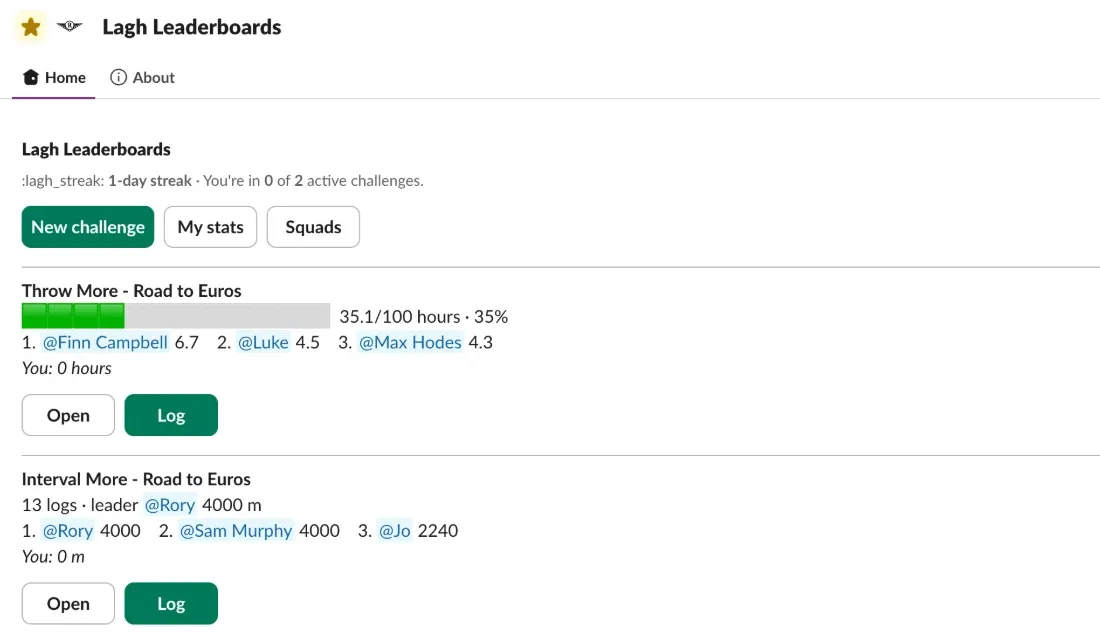
The club has 42 members in its Slack. About 25 are active, all of them log, and between them they add 5 to 10 logs a day.
What’s next?
The bot is live and in use. This plan builds on work I’ve already started, plus a review of the code made while writing this page.
Now: keep it running
- Node 22 before 30 October 2026. Google retires Node 20, which the functions run on, that day. The upgrade has been queued since July.
- The five emoji in the club’s workspace, so members stop seeing codes like “:lagh_streak:”.
- Small fixes: the doubled “(optional)” labels on the log form, chart settings that hide the chart titles, the “(Bot)” after its name, a Home tab that doesn’t refresh after a challenge is created or deleted, and other bots appearing on the full leaderboard.
- A backup. The code exists only on my Mac, so it needs a private online repository.
Next: finish what’s started
- Engagement. Count reactions and replies on teammates’ posts, in channels an admin chooses, as a light stat with no ranking. It was planned in June; whether to count whole channels or single threads is still to decide.
- Leaders’ controls. Anyone can create, edit, archive or delete a challenge, or change the squads. Leader-only controls were put off in June.
- A history of finished challenges, to look back at past challenges and their results.
- Tighter safeguards: a limit on running copies for the one function without one, a pause alert that reaches a person rather than only the logs, a check that the club’s app isn’t receiving every chat message (each one costs a request and a database write), and the nine moderate security warnings put off before launch.
- Billing of its own. Another project shares the bot’s billing account. Unlinking it keeps the budget about the bot alone.
Later
- Other clubs. Three ways to open it up to other Slack workspaces were set out in June. For now it’s for Ranelagh only.